AI virtual try-on for online fashion stores

Shoppers see themselves before they buy.

Add a “Try it on” button to your product pages: shoppers upload one full-body photo and see themselves in your product in about 15–40 seconds. More confidence when they choose, fewer returns because “it looked different on me”.

No card needed · One script tag · Shopify, WooCommerce, Haravan, Sapo, custom sites

Why virtual try-on

“Will it suit me?” answered right on your product page

  • Shoppers buy with more confidence

    Instead of guessing from a model photo, they see the piece on their own body shape, skin tone and pose.

  • Fewer “not what I expected” returns

    Shoppers see the fit and colours before ordering, so fewer orders arrive only to be sent back.

  • Measure the impact yourself

    The widget fires events when shoppers try on and get a result. Send them to your analytics to compare add-to-cart rates.

How it works

From sign-up to a “Try it on” button on your site

No redesign and no new product photos.

  1. 01

    Join the beta

    Send your email, store name and website. We email your key and install guide within 1–2 business days.

  2. 02

    Paste one script tag

    Add one line of code to your theme. In auto mode the “Try it on” button appears on product pages by itself; you can also place it yourself.

  3. 03

    The button sits next to “Add to cart”

    It uses your own product photos. No new photo shoot, no redesign.

  4. 04

    Shoppers upload a photo and see it

    They take or upload one full-body photo and see themselves wearing your product in about 15–40 seconds.

What your shoppers see

One piece or a full outfit, right on their phone

The widget uses the product photos already on your site. After one try-on, shoppers can try more pieces without a new photo.

  • Tops, trousers, skirts and dresses; one piece or a top with a bottom per try-on
  • Front or back camera, with a self-timer for a hands-free full-body shot
  • Keeps face, body shape, skin tone, pose and background; changes only the clothes
  • Vietnamese and English interface, following your page language
See the demo

The demo opens on app.macgi.app: try it with your own photo.

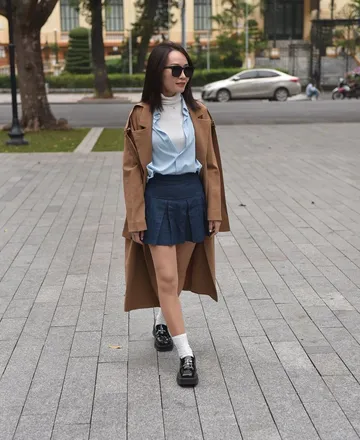
Woman in a white T-shirt, jeans and white sneakersWoman in a yellow top and a long floral skirtWoman in a long wool coat, blue shirt and pleated skirtWoman in a white crop top and black high-waisted wide-leg trousers
Sample product photos · Try-on images are AI-generated previews that show fit and colour. Sizing still follows your size chart.

Integrations

The widget works today on any website where you can add HTML, Haravan and Sapo included. Open a platform for its install guide.

See integration details

Your shoppers' photos are not kept

Shoppers only upload a photo when they trust it is safe. We built it so we never need to keep it.

  • Prepared on the device

    The photo is resized and stripped of all metadata (GPS location, camera, time) before it leaves the phone.

  • Shopper photos not stored

    Nothing about the shopper goes into a database. The temporary photo is deleted as soon as the try-on finishes.

  • Results deleted after 24 hours

    Results open only through expiring links and are deleted after 24 hours.

  • No AI training

    Shoppers' photos and your product images are never used to train models.

Pricing

Pricing

You pay only for successful try-ons: failed or cancelled ones are free. Post-beta prices will be published and announced to beta stores in advance.

See pricing details

Questions from store owners

What does the free beta include?
The full widget with 1,000 try-ons, no card needed, plus install help over Zalo and email. Before charging anything, we send you a quote and ask first.
My store runs on Haravan or Sapo. Can I install it?
Yes, as long as you can add HTML to your theme. The widget works on any website; dedicated Haravan and Sapo guides are on the way, and until then we help you install it.
Do I need a developer?
Not much: paste one script tag and add a few attributes to the button on your product page. If you have a web developer it is a small job; if not, we walk you through it.
Are shoppers' photos stored?
No. The photo is prepared on the device before upload, the temporary copy is deleted as soon as the try-on finishes, results are deleted after 24 hours, and no image is used to train AI.
Which products are supported?
Tops, trousers, skirts and dresses. Shoes, bags, accessories and underwear are not supported yet.
Does try-on tell shoppers their size?
Not yet. Try-on shows fit and colour; shoppers still choose their size from your size chart.
How long do shoppers wait?
Usually about 15–40 seconds. The first try after a quiet period can take a little longer.

From the blog

Latest style articles

See all articles

Let shoppers try on right in your store

Join the beta for 1,000 free try-ons. We reply within 1–2 business days.

Start free trial